> ## Documentation Index
> Fetch the complete documentation index at: https://help.dash.fi/llms.txt
> Use this file to discover all available pages before exploring further.
# Transaction statuses
> Understand what each Dash.fi transaction status means, see which charges are grouped into each scheduled payment, and learn what causes processing delays.
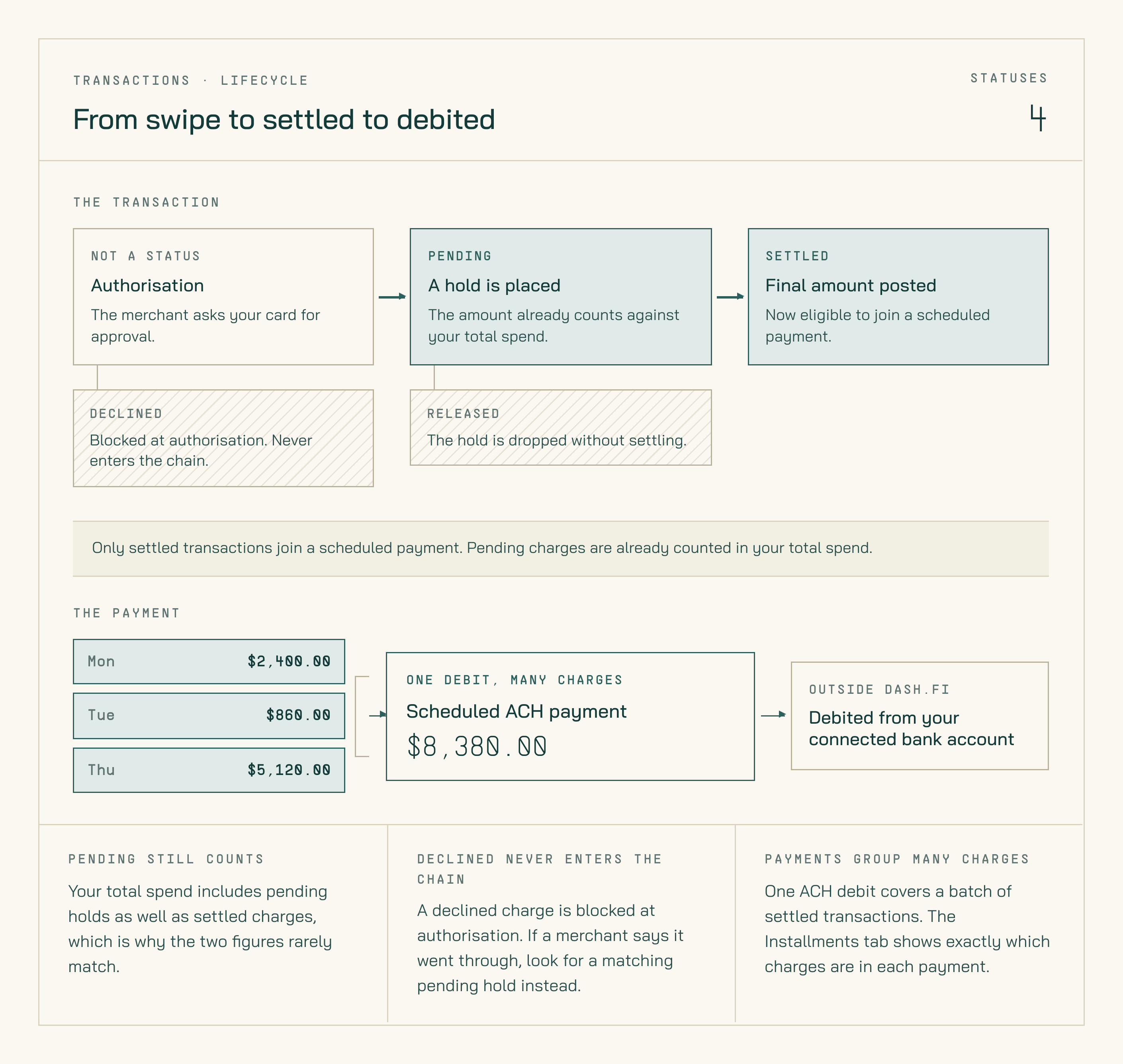
Every card transaction carries a status that tells you where it is between authorisation and settlement. Knowing what each one means helps you tell a charge that's still in progress from one that's cleared — and explains why your total spend and your pending total rarely match.
## Transaction statuses
| Status | Meaning |
| ------------ | ----------------------------------------------------------------------------------------------- |
| **Pending** | Authorised by the merchant, not yet settled. Pending holds still count toward your total spend. |
| **Settled** | Fully processed and cleared. Settled charges are the ones that join a scheduled payment. |
| **Released** | The authorisation hold was dropped without settling. No money moved and nothing is owed. |
| **Declined** | Blocked at authorisation. The charge never entered the settlement chain. |
 Check the status of any charge under **Spend → Card Transactions**. The page has **All**, **Settled**, **Pending**, and **Declined** tabs, and the Status column shows the current state of each row.
## How a charge progresses
Most charges follow the same path:
1. The merchant authorises the charge and it appears as **Pending**.
2. The merchant submits the charge for settlement, usually within 1–3 business days.
3. The charge becomes **Settled** and joins your next scheduled payment.
Two charges leave that path:
* A **Released** hold never settles. This happens when a merchant authorises an amount and then doesn't claim it — a hotel pre-authorisation, or a cancelled order. The hold falls off automatically.
* A **Declined** charge was blocked before authorisation completed, so it never becomes pending or settled. See [Card declines](/cards/card-declines) for what each decline reason means and how to fix it.
US banking holidays can slow settlement. If a charge sits in Pending longer than usual during a holiday period, that's typically the cause — it resumes on the next banking business day.
## Why total spend doesn't match your pending total
Your total spend includes **both** pending holds and settled charges. Your pending total includes only the holds that haven't settled yet. The two figures are measuring different things, so they'll almost never be equal.
If you want to reconcile them, compare the **All** tab against the **Pending** and **Settled** tabs under **Spend → Card Transactions**.
## Transaction not showing up?
If you've made a charge and it isn't visible yet:
1. Click **Refresh** in the dashboard to pull the latest data.
2. Give it a few moments — new authorisations can take a short time to appear.
If a merchant tells you a payment went through but you can't find it, check the **Pending** tab before assuming it failed. A charge that shows as declined in Dash.fi was never authorised, so no money left your account.
## Seeing which charges are in each payment
Settled card transactions are grouped into scheduled ACH payments that debit your connected bank account. To see exactly which charges are in a given payment:
In the left-hand navigation, go to **Spend → Payments**, then open the **Scheduled** tab.
**Scheduled** shows upcoming payments that haven't been debited yet. **Past** shows payments that have already processed.
Click a payment date to expand it and see the details for that payment.
The expanded view shows the payment amount and date, with two tabs:
* **ACH** — the payment debited from your connected bank account
* **Card Transactions** — every card charge included in that payment
The totals in the **ACH** tab and the **Card Transactions** tab should match exactly.
The **Card Transactions** tab also shows the original date each charge was made — useful for reconciling against platform-level ad spend reports.
If the ACH total and the Card Transactions total don't match for a payment, don't ignore it. Email [support@dash.fi](mailto:support@dash.fi) with the payment date and the amounts you're seeing.
Check the status of any charge under **Spend → Card Transactions**. The page has **All**, **Settled**, **Pending**, and **Declined** tabs, and the Status column shows the current state of each row.
## How a charge progresses
Most charges follow the same path:
1. The merchant authorises the charge and it appears as **Pending**.
2. The merchant submits the charge for settlement, usually within 1–3 business days.
3. The charge becomes **Settled** and joins your next scheduled payment.
Two charges leave that path:
* A **Released** hold never settles. This happens when a merchant authorises an amount and then doesn't claim it — a hotel pre-authorisation, or a cancelled order. The hold falls off automatically.
* A **Declined** charge was blocked before authorisation completed, so it never becomes pending or settled. See [Card declines](/cards/card-declines) for what each decline reason means and how to fix it.
US banking holidays can slow settlement. If a charge sits in Pending longer than usual during a holiday period, that's typically the cause — it resumes on the next banking business day.
## Why total spend doesn't match your pending total
Your total spend includes **both** pending holds and settled charges. Your pending total includes only the holds that haven't settled yet. The two figures are measuring different things, so they'll almost never be equal.
If you want to reconcile them, compare the **All** tab against the **Pending** and **Settled** tabs under **Spend → Card Transactions**.
## Transaction not showing up?
If you've made a charge and it isn't visible yet:
1. Click **Refresh** in the dashboard to pull the latest data.
2. Give it a few moments — new authorisations can take a short time to appear.
If a merchant tells you a payment went through but you can't find it, check the **Pending** tab before assuming it failed. A charge that shows as declined in Dash.fi was never authorised, so no money left your account.
## Seeing which charges are in each payment
Settled card transactions are grouped into scheduled ACH payments that debit your connected bank account. To see exactly which charges are in a given payment:
In the left-hand navigation, go to **Spend → Payments**, then open the **Scheduled** tab.
**Scheduled** shows upcoming payments that haven't been debited yet. **Past** shows payments that have already processed.
Click a payment date to expand it and see the details for that payment.
The expanded view shows the payment amount and date, with two tabs:
* **ACH** — the payment debited from your connected bank account
* **Card Transactions** — every card charge included in that payment
The totals in the **ACH** tab and the **Card Transactions** tab should match exactly.
The **Card Transactions** tab also shows the original date each charge was made — useful for reconciling against platform-level ad spend reports.
If the ACH total and the Card Transactions total don't match for a payment, don't ignore it. Email [support@dash.fi](mailto:support@dash.fi) with the payment date and the amounts you're seeing.