

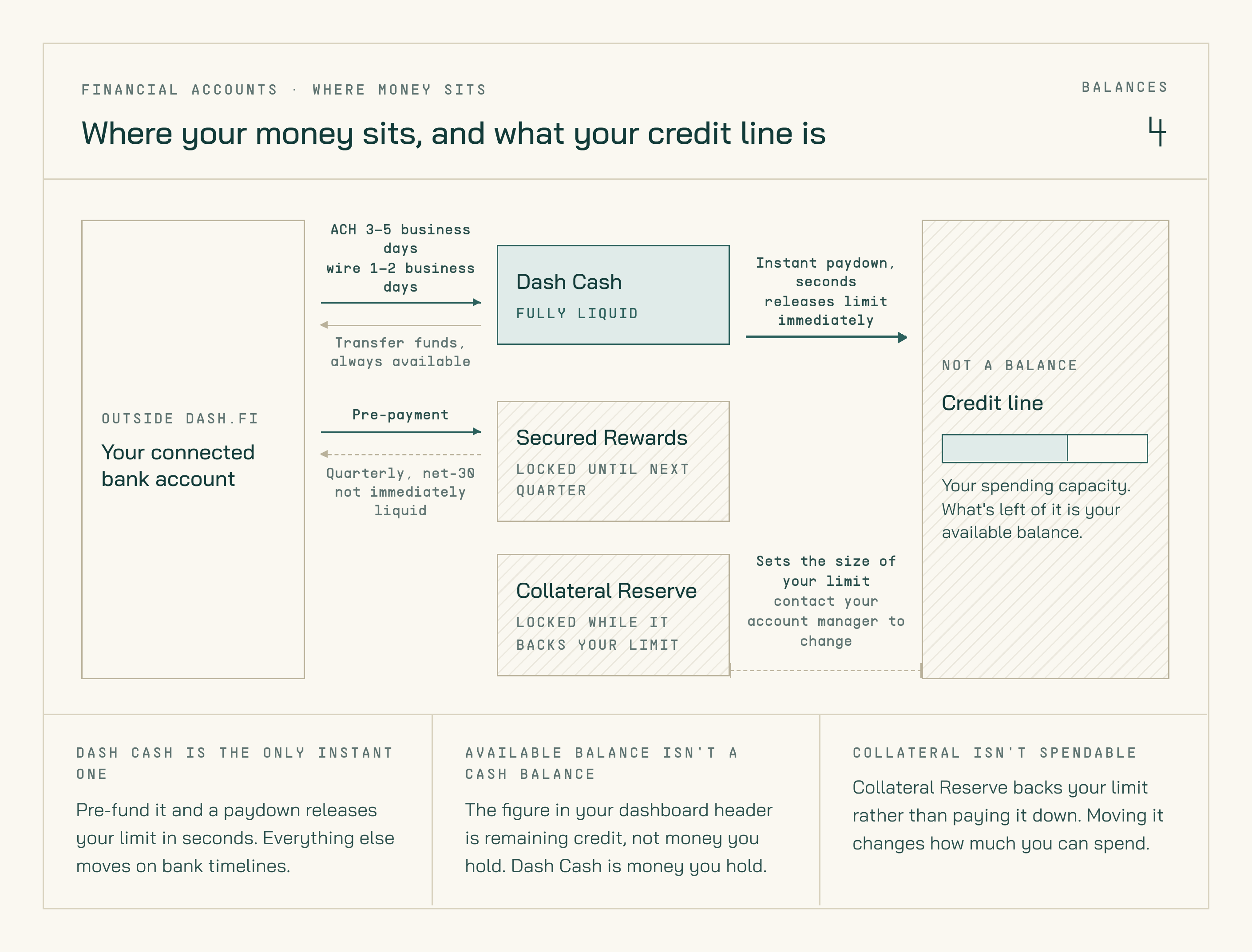
Where money sits across your bank account and the three Dash.fi accounts — and why your credit line isn't a balance.
Account types
Dash Cash
A funding account that lets you pre-load funds and instantly apply them to pay down your credit line. When your Dash Cash balance is available, payments settle in seconds — not the 1–3 days of a bank transfer. Dash Cash is available on all net terms, including Net 1. Net-1 customers can pre-fund Dash Cash and pay down their credit line instantly — the header Make Payment button is hidden on Net 1, so Net-1 customers trigger the payment from the Scheduled Payments tab instead. See Dash Cash for funding steps and how to make an instant payment.Secured Rewards Account
Holds pre-payment collateral for customers in the Secured Rewards Program. Balances in this account support your elevated cashback rate and earn annual loyalty rewards in lieu of interest. Pre-payment funds are held at FDIC-insured partner banks in your company’s name. Funds are not immediately liquid — return is quarterly on a net-30 basis. See Secured Rewards Program for details on how this program works.Collateral Reserve Account
Holds collateral tied to your overall credit line and spend limit. This account underpins your account’s risk profile. Changes to the Collateral Reserve balance affect your available spend limit. Contact your account manager to adjust your collateral reserve or to discuss increasing your spend limit.Funding methods
You can add funds to your Dash Cash or Secured Rewards account using any of the following methods:Daily limit
The maximum incoming funding per day across all methods is $250,000.Wire memo line
When sending a domestic or international wire, copy the memo line exactly as shown in the dashboard. The memo is used for automated matching — an incorrect or missing memo will delay posting.Withdrawing funds
How you get money out depends on which account it’s in. Only Dash Cash is self-serve.Dash Cash
1
Open Financial Accounts
In the left-hand navigation, click Financial Accounts.
2
Open Dash Cash
Click the Dash Cash account to open its detail view.
3
Select Transfer Funds
Click Transfer Funds, enter the amount, and choose the connected bank account to send it to.
4
Confirm
Review and confirm. The funds return to your connected bank account by ACH.